

How to Triage an AI Agent Execution Graph: A Three-Tier Decision Framework for Security Teams
A platform security engineer gets an alert at 2:14 a.m. One of the LangChain agents...

 Blog
Blog

Sep 2, 2025

These days it seems everyone is obsessed with MCP servers, me included.
After studying the topic and building a few MCP servers myself, I have decided to share the knowledge I have gained with a series of blogs on MCP servers and their security implications.
This series is about the security side of MCP servers: how they work, how attackers can abuse them, and what you can do to protect yourself. Let’s start with the basics.
If you want to learn what an MCP server is, this blog is a good place to start.
Large Language Models (LLMs) are powerful, but they have one huge flaw: they don’t know enough. Their knowledge is frozen at training time, they can’t fetch your latest data, and they might hallucinate answers. That is a problem if you expect them to power real-life workflows.
The Model Context Protocol (MCP) was created to address this problem. MCP lets an LLM call out to external servers for real, contextual, and up-to-date data and information.
LLMs are like a brilliant intern who hasn’t been “connected” for months. They can reason about problems, but:
That might be fine for casual chat (though it can be awkward not to know who won the last Dancing with the Stars 😉), but not for real-life tasks you want LLM to do. If you want an LLM to answer questions based on more up-to-date knowledge, you need to provide the information in the prompt, or you need to give it access to information resources it can not access alone. If you want it to do more, like create customer tickets, trigger workflows, or monitor systems, it needs a way to reach the outside world safely.
These connections to external resources and tools to interact with the outside world are what MCP provides.
MCP was defined by Anthropic, the company behind Claude. The protocol is open and intended to become a standard way for models and tools to interact.
Support for MCP is growing. Anthropic’s Claude models already support it, and other model providers are expected to follow. This matters because it means MCP is not just a research project. It is becoming a building block for enterprise-scale LLM usage.
One of the key innovations is that LLMs are trained to understand when and how to call MCP tools. During training, models see examples where the right solution is not in their internal knowledge but requires calling an external tool.
Over time, the model learns patterns like:
The protocol makes these calls explicit and structured, so the model does not need to guess or hallucinate.
At a high level:
Instead of hard-coding integrations, MCP defines a protocol for discovery and execution. The server declares its tools, the client exposes them to the LLM, and the LLM decides when to use them.
Think of it as open and discoverable APIs for LLMs, but standardized and explicit.
Think about it as a standardized way an LLM can interact with the real world, both for obtaining information and executing tasks.
Every MCP server can expose tools and/or resources
When the server connects, it tells the client:
The LLM now has a menu of reliable actions it can resort to when needed during prompt processing.
See the interface flow here:
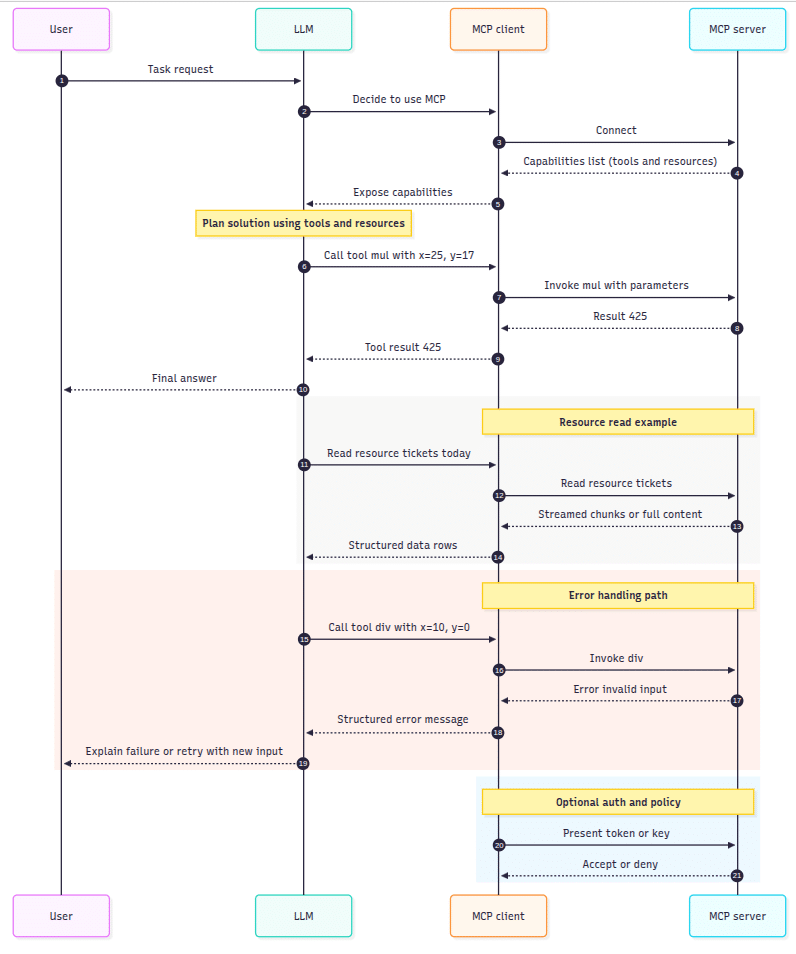
To illustrate this, consider the following example. Imagine you need your LLM to handle basic algebra. In the early days of ChatGPT, people were making jokes about how bad answers they got when they asked the chat to answer simple algebra questions like what is 25×17. To solve this, you spin up an MCP server with four tools:
The MCP Server introduces itself to the LLM with this tool description:
{
  "name": "mul",
  "description": "Multiply two numbers",
  "parameters": {
    "x": "number",
    "y": "number"
  }
}
Then the LLM calls mul(25, 17) instead of trying to hallucinate the math.
The server responds with:
{
  "result": 425
}
Voila!
This is how it looks like in a schematic diagram:

To show how it looks in practice, I built a simple Go MCP server:
👉 github.com/slashben/example-go-mcp-server
It exposes math tools to an LLM through MCP. The code is intentionally minimal so you can see exactly how tools and resources are declared, and how the handshake works between the server and the client.
This is the foundation. Servers like this can be extended to pull tickets from Jira, query Kubernetes, or send alerts.
That is MCP in a nutshell: a protocol that gives LLMs a safe way to access tools and data.
But every new protocol comes with a new attack surface. What if the server itself is malicious? What if it lies about the data it returns? What if it leaks sensitive information back to an attacker?
In the next part of the MCP Server Security Series, we will look at exactly that: how attackers can abuse MCP servers.
Stay tuned!
A platform security engineer gets an alert at 2:14 a.m. One of the LangChain agents...
Security teams deploying AI agents into Kubernetes know they need behavioral baselines. The concept is...
When your CNAPP flags a suspicious dependency in an AI agent container, your WAF logs...





 Continue as a guest